PIXNET Logo登入

MISTECH 技術手抄本

跳到主文

歡迎光臨 MIS 工作者在痞客邦的小天地

部落格全站分類:圖文創作

  • 相簿
  • 部落格
  • 留言
  • 名片
  • 12月 03 週二 201923:08
  • WordPress 使用 WP Mail SMTP 透過 GMail 來寄信

在 WordPress 實用外掛推薦 有提到 WP Mail SMTP by WPForms & Post SMTP Mailer/Email Log 都是 WordPress 的寄信外掛程式,它可以讓 WordPress 透過本機或外部的郵件主機來寄發信件。

  1. WP Mail SMTP by WPForms 功能說明
  2. WP Mail SMTP by WPForms 透過 Goole API 方式寄信的設定
  3. 建立 Google Cloud IAM 專案
  4. 建立 Google API 憑證
  5. 電子郵件測試驗證


  • WP Mail SMTP by WPForms 功能說明

(繼續閱讀...)
文章標籤

MIS 發表在 痞客邦 留言(0) 人氣(196)

  • 個人分類:
▲top
  • 12月 01 週日 201920:52
  • WordPress 搬家 網站搬移到網址

WordPress 若要搬到新的主機要注意的事項,記錄如下:

用手動來搬家比較安全,因為這才知道你自已在作什麼,主要有下列幾個步驟:

  1. Upload your website to new host
  2. Export/Import Your WordPress Database
  3. Modify two records: siteurl & home on table: wp_options
  4. Modify wp-config.php File
  5. Change all the URL of guid & post content in the posts


(繼續閱讀...)
文章標籤

MIS 發表在 痞客邦 留言(0) 人氣(98)

  • 個人分類:
▲top
  • 12月 14 週五 201814:11
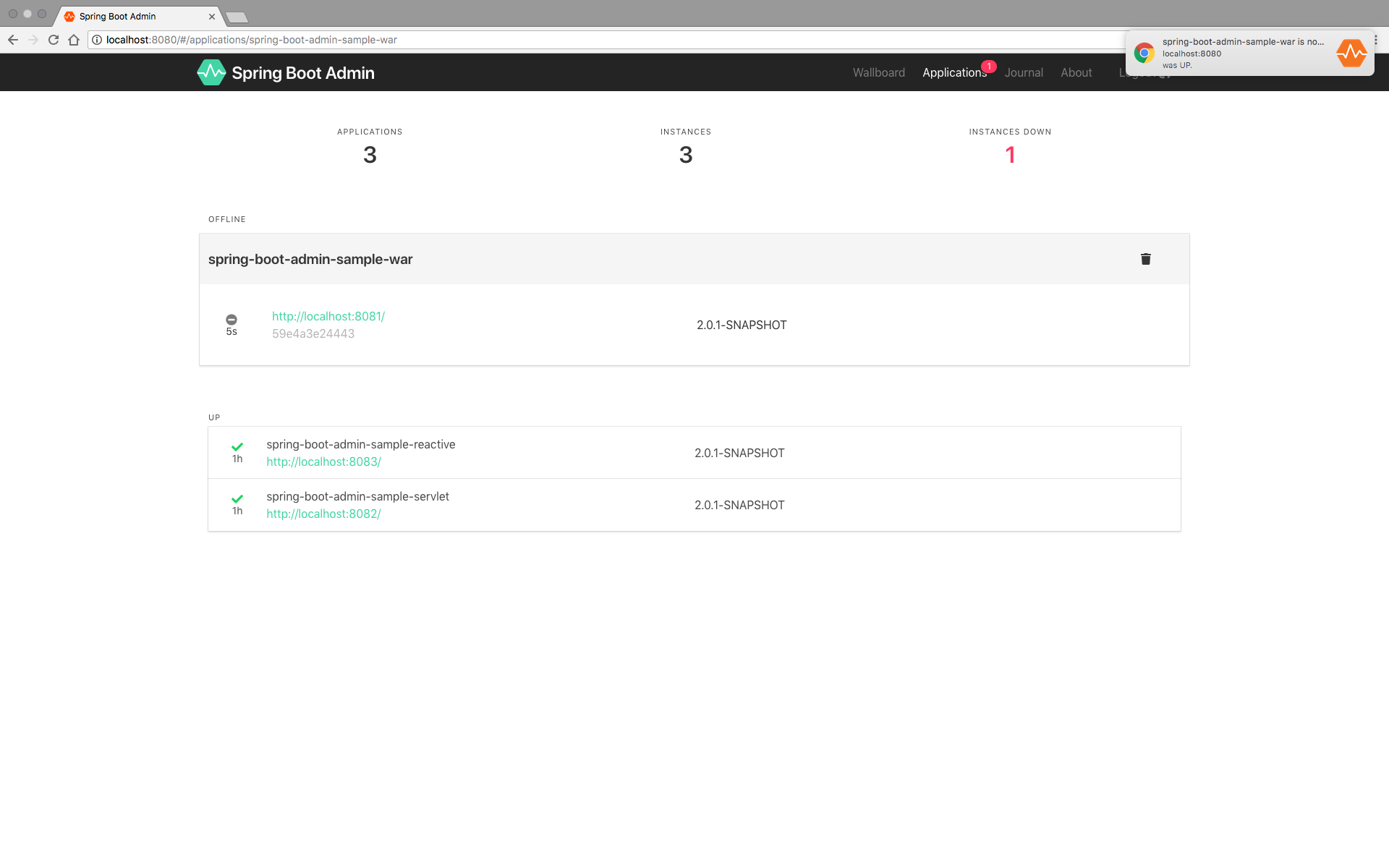
  • Spring Boot Admin 強大的 Spring Boot 監控工具

利用 Spring Boot 可以快速開發客製化應用系統, 而這些由 Spring Boot 框架建立的應用系統則可以利用 Spring Boot Admin 來作統一的管理. 由這系統可以讓您知道 Application Server 的版本如: Java , Tomcat , session .... 等, 所以在管理這些服務系統架構中...監控管理是非常重要的一環

Server 端

1. 建立一個新的 Spring Starter Project : sbAdmin , 且只要選擇 Web 就好. 其它的相依套件如下:

buildscript { ext { springBootVersion = '2.1.1.RELEASE' } repositories { mavenCentral() } dependencies { classpath("org.springframework.boot:spring-boot-gradle-plugin:${springBootVersion}") } } apply plugin: 'java' apply plugin: 'eclipse' apply plugin: 'org.springframework.boot' apply plugin: 'io.spring.dependency-management' group = 'com.admin' version = '0.0.1-SNAPSHOT' sourceCompatibility = 1.8 repositories { mavenCentral() } dependencies { implementation('org.springframework.boot:spring-boot-starter-web') compile('de.codecentric:spring-boot-admin-starter-server:2.1.1') // SpringBoot Admin testImplementation('org.springframework.boot:spring-boot-starter-test') } 

Server 端的 application.properties 設定啟動的 port: 8099

(繼續閱讀...)
文章標籤

MIS 發表在 痞客邦 留言(0) 人氣(1,841)

  • 個人分類:
▲top
  • 12月 07 週五 201816:11
  • [Solved] DocumentBuilder parse XML returns null <解決 org.w3c.dom.Document 解析 XML 檔回傳值均為 NULL>

Document 解析 XML 檔案時, 解析的值總是為 NULL , 解決方法如下:

先把檔案用 StringBuilder 變成字串後, 再作解析就可以


import org.springframework.util.ResourceUtils; import org.w3c.dom.Document; import org.w3c.dom.NodeList; import org.w3c.dom.Node; import java.io.ByteArrayInputStream; import java.io.File; import java.io.IOException; import java.io.FileInputStream; import java.io.FileNotFoundException; import java.io.InputStream; import java.nio.charset.StandardCharsets; import java.nio.file.Files; import java.nio.file.Paths; import java.util.stream.Stream; public class TestFunc { public static void main(String[] args) throws Exception { // TODO Auto-generated method stub try { File xmlFile = ResourceUtils.getFile("classpath:ckfinder-config.xml"); readMXLFile(xmlFile); } catch (FileNotFoundException e) { // TODO Auto-generated catch block e.printStackTrace(); } } public static void readMXLFile(File xmlFile) throws Exception { InputStream is = new FileInputStream(xmlFile); StringBuilder contentBuilder = new StringBuilder(); try (Stream stream = Files.lines(Paths.get(xmlFile.getAbsolutePath()), StandardCharsets.UTF_8)) { stream.forEach(s -> contentBuilder.append(s).append("\n")); } catch (IOException e) { e.printStackTrace(); } System.out.println(contentBuilder.toString()); ByteArrayInputStream bis = new ByteArrayInputStream(contentBuilder.toString().getBytes()); DocumentBuilderFactory dbf = DocumentBuilderFactory.newInstance(); dbf.setIgnoringComments(true); dbf.setIgnoringElementContentWhitespace(true); DocumentBuilder db = dbf.newDocumentBuilder(); Document doc = db.parse(bis); // Normalize the XML Structure; It's just too important !! doc.getDocumentElement().normalize(); Node node = doc.getFirstChild(); if (node != null) { NodeList nodeList = node.getChildNodes(); boolean enabled = false; for (int i = 0; i < nodeList.getLength(); ++i) { Node childNode = nodeList.item(i); if (childNode.getNodeName().equals("enabled")) enabled = Boolean.valueOf(childNode.getTextContent().trim()).booleanValue(); } } } } 

(繼續閱讀...)
文章標籤

MIS 發表在 痞客邦 留言(0) 人氣(390)

  • 個人分類:
▲top
  • 11月 14 週三 201813:06
  • Spring Boot 中使用 Freemarker 開發客製標籤<Develop custom taglib using Freemarker in Spring Boot>

在 Spring Boot 使用 Freemarker 模板來快速建立客製化的標籤 (taglib) 是非常簡單的事. 作下列幾個步驟即可.

Step 01:  設定一個 Freemarker Template:  /src/main/resources/templates/demo/ftlTagSample.ftl

<body>         <div><h2>WELCOME,${userName}</h2></div>     <div>Title:${userTitle}</div> </body> 

Step 02: 建立 tag 的 class : FtlTemplateTag.java

public class FtlTemplateTag extends TagSupport { private static final long serialVersionUID = 1L; private String fileName = null; private String paramsStr = null; private String columnsStr = null; private ResourceBundleMessageSource messageSource = new ResourceBundleMessageSource(); public void setFileName(String fileName) { this.fileName = fileName; } public void setParamsStr(String paramsStr) { this.paramsStr = paramsStr; } public void setColumnsStr(String columnsStr) { this.columnsStr = columnsStr; } /** * JSON 字串轉換成 MAP * @return */ private Map setParams() { Gson gson = new Gson(); return gson.fromJson(paramsStr, new TypeToken>() { }.getType()); } private Map setColumns(){ Locale locale = LocaleContextHolder.getLocale(); messageSource.setBasenames("i18n/messages"); Gson gson = new Gson(); Map columns = gson.fromJson(columnsStr, new TypeToken>() {}.getType() ); //轉換多語系 Map dataModel = new LinkedHashMap(); columns.forEach( (k,v)-> dataModel.put(k, messageSource.getMessage(v, null, v, locale)) ); return dataModel; } @Override public int doStartTag() throws JspException { JspWriter out = pageContext.getOut(); Configuration conf = new Configuration(); conf.setClassForTemplateLoading(this.getClass(), "/templates/"); conf.setDefaultEncoding("UTF-8"); try { Template tl = conf.getTemplate(fileName); Map dataModel = new HashMap(); dataModel.putAll(this.setParams()); dataModel.put("columns", this.setColumns()); tl.process(dataModel, out); } catch (Exception e) { e.printStackTrace(); } return Tag.SKIP_BODY; } } 

(繼續閱讀...)
文章標籤

MIS 發表在 痞客邦 留言(0) 人氣(240)

  • 個人分類:
▲top
  • 9月 28 週五 201813:44
  • Spring Boot Validating Form Input with i18n and FreeMarker

build.gradle

buildscript { ext { springBootVersion = '2.0.4.RELEASE' jjwtVersion = '0.9.0' findbugsVersion='3.0.1' bootstrapVersion = '3.3.7' jqueryVersion = '3.3.1' vueVersion ='2.5.13' fontawesomeVersion = '5.2.0' jspapiVersion = '2.3.3' } repositories { mavenCentral() } dependencies { classpath("org.springframework.boot:spring-boot-gradle-plugin:${springBootVersion}") } } /* * 在這個段落中你可以聲明使用哪些外掛程式 * apply plugin: 'java' 代表這是一個Java專案,需要使用java外掛程式 * 如果想生成一個 `Intellij IDEA` 的工程,類似的如果要生成 * eclipse工程,就寫 apply plugin: 'eclipse' * 同樣的我們要學的是Spring Boot,所以應用Spring Boot外掛程式 */ apply plugin: 'java' apply plugin: 'eclipse' apply plugin: 'org.springframework.boot' apply plugin: 'io.spring.dependency-management' // 在這個段落中你可以聲明編譯後的Jar檔資訊 bootJar { baseName = 'myspring' group = 'com.polinwei' version = '0.0.1-SNAPSHOT' } // 在這個段落中你可以聲明原始檔案和目標編譯後的Java版本相容性 sourceCompatibility = 1.8 targetCompatibility = 1.8 // 在這個段落中你可以聲明在哪裡可以找到你的項目依賴 repositories { mavenCentral() maven { url "https://repo.spring.io/snapshot" } maven { url "https://repo.spring.io/milestone" } maven { url "https://code.lds.org/nexus/content/groups/main-repo"} maven { url "http://maven.aliyun.com/nexus/content/repositories/central"} } dependencies { compile("org.springframework.boot:spring-boot-starter-data-jpa") compile("org.springframework.boot:spring-boot-starter-thymeleaf") compile("org.springframework.boot:spring-boot-starter-freemarker") compile("org.springframework.boot:spring-boot-starter-web") compile("org.springframework.boot:spring-boot-starter-security") compile("org.springframework.security:spring-security-taglibs") compile("org.springframework.boot:spring-boot-devtools") // Class 程式有更改時, 自動重啟 compile("org.hibernate.validator:hibernate-validator") //驗證 compile("javax.servlet.jsp:javax.servlet.jsp-api:${jspapiVersion}") compile("org.springframework.session:spring-session-data-redis") compile("org.springframework.boot:spring-boot-starter-data-redis") runtime("mysql:mysql-connector-java") compileOnly("org.projectlombok:lombok") compile("com.maxmind.geoip2:geoip2:2.12.0") compile("io.jsonwebtoken:jjwt:${jjwtVersion}") compile("com.google.code.findbugs:findbugs:${findbugsVersion}") compile("org.webjars:bootstrap:${bootstrapVersion}") compile("org.webjars:jquery:${jqueryVersion}") compile("org.webjars:vue:${vueVersion}") compile("org.webjars:font-awesome:${fontawesomeVersion}") compile("org.webjars.bowergithub.lipis:flag-icon-css:3.1.0") compileOnly("org.springframework.boot:spring-boot-configuration-processor") testCompile("org.springframework.boot:spring-boot-starter-test") testCompile("org.springframework.security:spring-security-test") } 
model: Authority.java

/** * Authority generated by hbm2java */ @Entity @Table(name = "authority", uniqueConstraints = @UniqueConstraint(columnNames = "name")) public class Authority implements java.io.Serializable { private Long id; private String name; @Size(min=2, max=30 , message = "{Size}") private String description; private Set users = new HashSet(0); public Authority() { } public Authority(String name, String description) { this.name = name; this.description = description; } public Authority(String name, String description, Set users) { this.name = name; this.description = description; this.users = users; } @Id @GeneratedValue(strategy = IDENTITY) @Column(name = "id", unique = true, nullable = false) public Long getId() { return this.id; } public void setId(Long id) { this.id = id; } @Column(name = "name", unique = true, nullable = false, length = 50) public String getName() { return this.name; } public void setName(String name) { this.name = name; } @Column(name = "description", nullable = false, length = 100) public String getDescription() { return this.description; } public void setDescription(String description) { this.description = description; } @ManyToMany(fetch = FetchType.LAZY) @JoinTable(name = "user_authority", joinColumns = { @JoinColumn(name = "authority_id", nullable = false, updatable = false) }, inverseJoinColumns = { @JoinColumn(name = "user_id", nullable = false, updatable = false) }) @JsonBackReference public Set getUsers() { return this.users; } public void setUsers(Set users) { this.users = users; } } 

Control: AuthorityController.java

(繼續閱讀...)
文章標籤

MIS 發表在 痞客邦 留言(0) 人氣(108)

  • 個人分類:
▲top
  • 9月 17 週一 201813:52
  • pdfmake 實現中文字支援,解決中文亂碼問題,以 DataTables 為例

實現pdfmake使用中文本體主要就是編譯新的vfs_fonts.js代替原來vfs_fonts.js文檔引入到前端頁面中,為了編譯出新的字體文檔,下列是中文顯示的解決方法,供大家參考:

操作系統:Windows

操作步驟:

1. 安裝node.js

2. 下載pdfmake的源代碼、下載地址https://github.com/bpampuch/pdfmake

(繼續閱讀...)
文章標籤

MIS 發表在 痞客邦 留言(0) 人氣(3,480)

  • 個人分類:
▲top
  • 9月 11 週二 201810:36
  • How To Solve JSON infinite recursion Stackoverflow (Direct self-reference leading to cycle)

使用 Hibernate Tool 去產生 Domain Code ( Model ) 時, 當 User.java & Authority.java 有相互參考時, 在 spring boot 使用 @RestController 會發生 Direct self-reference leading to cycle 的錯誤訊息, 解決的方法可以在 Domain Code ( Model ) 上加上 @JsonManagedReference & @JsonBackReference 來防止錯誤.


User.java

/** * User generated by hbm2java */ @Entity @Table(name = "user") public class User implements java.io.Serializable { private Long id; private User userByCreateUser; private User userByUpdateUser; private String username; private String password; private String firstname; private String lastname; private String email; private Boolean enabled; private Date lastpasswordresetdate; private Date activeDate; private Date inactiveDate; private Date createDate; private Date updateDate; private Set authorities = new HashSet(0); private Set usersForCreateUser = new HashSet(0); private Set usersForUpdateUser = new HashSet(0); public User() { } public User(String username, String password, String firstname, String lastname, String email, Date lastpasswordresetdate) { this.username = username; this.password = password; this.firstname = firstname; this.lastname = lastname; this.email = email; this.lastpasswordresetdate = lastpasswordresetdate; } public User(User userByCreateUser, User userByUpdateUser, String username, String password, String firstname, String lastname, String email, Boolean enabled, Date lastpasswordresetdate, Date activeDate, Date inactiveDate, Date createDate, Date updateDate, Set authorities, Set usersForCreateUser, Set usersForUpdateUser) { this.userByCreateUser = userByCreateUser; this.userByUpdateUser = userByUpdateUser; this.username = username; this.password = password; this.firstname = firstname; this.lastname = lastname; this.email = email; this.enabled = enabled; this.lastpasswordresetdate = lastpasswordresetdate; this.activeDate = activeDate; this.inactiveDate = inactiveDate; this.createDate = createDate; this.updateDate = updateDate; this.authorities = authorities; this.usersForCreateUser = usersForCreateUser; this.usersForUpdateUser = usersForUpdateUser; } @Id @GeneratedValue(strategy = IDENTITY) @Column(name = "id", unique = true, nullable = false) public Long getId() { return this.id; } public void setId(Long id) { this.id = id; } @ManyToOne(fetch = FetchType.LAZY) @JoinColumn(name = "create_user") public User getUserByCreateUser() { return this.userByCreateUser; } public void setUserByCreateUser(User userByCreateUser) { this.userByCreateUser = userByCreateUser; } @ManyToOne(fetch = FetchType.LAZY) @JoinColumn(name = "update_user") public User getUserByUpdateUser() { return this.userByUpdateUser; } public void setUserByUpdateUser(User userByUpdateUser) { this.userByUpdateUser = userByUpdateUser; } @Column(name = "username", nullable = false, length = 50) public String getUsername() { return this.username; } public void setUsername(String username) { this.username = username; } @Column(name = "password", nullable = false, length = 100) public String getPassword() { return this.password; } public void setPassword(String password) { this.password = password; } @Column(name = "firstname", nullable = false, length = 50) public String getFirstname() { return this.firstname; } public void setFirstname(String firstname) { this.firstname = firstname; } @Column(name = "lastname", nullable = false, length = 50) public String getLastname() { return this.lastname; } public void setLastname(String lastname) { this.lastname = lastname; } @Column(name = "email", nullable = false, length = 50) public String getEmail() { return this.email; } public void setEmail(String email) { this.email = email; } @Column(name = "enabled") public Boolean getEnabled() { return this.enabled; } public void setEnabled(Boolean enabled) { this.enabled = enabled; } @Temporal(TemporalType.TIMESTAMP) @Column(name = "lastpasswordresetdate", nullable = false, length = 19) public Date getLastpasswordresetdate() { return this.lastpasswordresetdate; } public void setLastpasswordresetdate(Date lastpasswordresetdate) { this.lastpasswordresetdate = lastpasswordresetdate; } @Temporal(TemporalType.TIMESTAMP) @Column(name = "active_date", length = 19) public Date getActiveDate() { return this.activeDate; } public void setActiveDate(Date activeDate) { this.activeDate = activeDate; } @Temporal(TemporalType.TIMESTAMP) @Column(name = "inactive_date", length = 19) public Date getInactiveDate() { return this.inactiveDate; } public void setInactiveDate(Date inactiveDate) { this.inactiveDate = inactiveDate; } @Temporal(TemporalType.TIMESTAMP) @Column(name = "create_date", length = 19) public Date getCreateDate() { return this.createDate; } public void setCreateDate(Date createDate) { this.createDate = createDate; } @Temporal(TemporalType.TIMESTAMP) @Column(name = "update_date", length = 19) public Date getUpdateDate() { return this.updateDate; } public void setUpdateDate(Date updateDate) { this.updateDate = updateDate; } @ManyToMany(fetch = FetchType.LAZY) @JoinTable(name = "user_authority", catalog = "my_spring", joinColumns = { @JoinColumn(name = "user_id", nullable = false, updatable = false) }, inverseJoinColumns = { @JoinColumn(name = "authority_id", nullable = false, updatable = false) }) @JsonManagedReference public Set getAuthorities() { return this.authorities; } public void setAuthorities(Set authorities) { this.authorities = authorities; } @OneToMany(fetch = FetchType.LAZY, mappedBy = "userByCreateUser") public Set getUsersForCreateUser() { return this.usersForCreateUser; } public void setUsersForCreateUser(Set usersForCreateUser) { this.usersForCreateUser = usersForCreateUser; } @OneToMany(fetch = FetchType.LAZY, mappedBy = "userByUpdateUser") public Set getUsersForUpdateUser() { return this.usersForUpdateUser; } public void setUsersForUpdateUser(Set usersForUpdateUser) { this.usersForUpdateUser = usersForUpdateUser; } } 


(繼續閱讀...)
文章標籤

MIS 發表在 痞客邦 留言(0) 人氣(341)

  • 個人分類:
▲top
  • 8月 29 週三 201817:15
  • SpringBoot + SpringSecurity + Freemarker 頁面中使用 security 標籤

SpringBoot+SpringSecurity+Freemarker專案中在頁面上使用security標籤控制按鈕顯示隱藏達到對按鈕級許可權控制還是比較方便的,如下配置即可。


1. gradle 引入依賴

 dependencies { compile("org.springframework.security:spring-security-taglibs") compile("javax.servlet.jsp:javax.servlet.jsp-api:2.3.3") } 


2. 依賴引入後到spring-security-taglibs包中META-INF下security.tld複製出來,放到/resources/static下,最後建一個目錄tags,如下:

springboot-taglib.jpg
3. 建一個配置類

(繼續閱讀...)
文章標籤

MIS 發表在 痞客邦 留言(0) 人氣(143)

  • 個人分類:
▲top
  • 8月 10 週五 201815:09
  • 使用 highlight.js 讓 pixnet 顯示程式碼

除了 痞客邦 PIXNET 使用 Syntax Highlighter 顯示程式碼 以外, 也可以使用 highlight.js 來讓 pixnet 顯示程式碼

在後台管理的 側欄管理, 選擇 頁尾描述加入

<link rel="stylesheet" href="//cdnjs.cloudflare.com/ajax/libs/highlight.js/9.12.0/styles/default.min.css"/> <script src="//cdnjs.cloudflare.com/ajax/libs/highlight.js/9.12.0/highlight.min.js"></script> <script src="//cdnjs.cloudflare.com/ajax/libs/highlight.js/9.12.0/languages/go.min.js"></script> <script>hljs.initHighlightingOnLoad();</script>


日後要展示程式碼的部分,先在撰寫貼上程式碼,轉到原始碼模式,用

<pre><code class="html">...</code></pre>

(繼續閱讀...)
文章標籤

MIS 發表在 痞客邦 留言(0) 人氣(86)

  • 個人分類:
▲top
«123...15»

Google Search 站內文章搜尋

熱門文章

  • ()Certificate Authority(CA) 憑證簡介
  • ()
  • ()Oracle SQL Loader
  • ()
  • ()IP Address & CIDR 概念
  • ()
  • ()Oracle RMAN 的基本概念與資料庫全備份實作
  • ()
  • ()
  • ()

bloggerads-header

BloggerADs

參觀人氣

  • 本日人氣:
  • 累積人氣:

文章分類

toggle HTML (2)
  • HTML - CSS (1)
  • HTML - SSL (6)
toggle XOOPS (2)
  • 架站前的準備工作 (8)
  • XOOPS2 的安裝與使用 (1)
toggle DataBase (2)
  • DB - MSSQL (10)
  • DB - ORACLE (11)
toggle PHP (2)
  • PHP - BASIC (6)
  • Yii2 (1)
toggle JavaScript (1)
  • JS - BASIC (5)
toggle Linux (1)
  • Linux - BASIC (7)
toggle Oracle EBS (4)
  • EBS - INV (1)
  • EBS - BASIC (4)
  • EBS - Interface (1)
  • EBS - OAF (3)
toggle PL/SQL (1)
  • PL/SQL - BASIC (1)
toggle Java (5)
  • JAVA - Struts2 (16)
  • JAVA - BASIC (9)
  • JAVA - ADF (3)
  • Struts2 + Spring4 + Hibernate4 (10)
  • Java - Spring (2)
toggle Server (6)
  • Tomcat (1)
  • JBoss (13)
  • Weblogic (1)
  • OS (2)
  • VMware (3)
  • Apache (2)
toggle PTC-Windchill (1)
  • System系統類 (1)
  • Python (1)
  • 未分類文章 (1)

個人資訊

MIS
暱稱:
MIS
分類:
圖文創作
好友:
累積中
地區:

誰來我家